

Shopify is a popular e-commerce platform used by many companies around the world. By identifying Shopify sites, you can analyze competitors' strategies and discover ways to improve your own site. This article introduces how to tell whether a reference site is built on Shopify, and how to find out which Shopify theme it's using.
The blog article below introduces the pros and cons of Shopify. Please use it as a reference.

Benefits of Identifying a Shopify Site
Enables Analysis of a Reference Store's Strategy
By identifying a Shopify site, you can find out whether a competitor is using Shopify. You can analyze the competitor's site structure, design, and features, and use it to help shape your own strategy.
Enables You to Discover Improvements for Your Own Site
By looking at other companies' sites that use Shopify, you can gather examples of how Shopify is used. Comparing your own site with other sites lets you discover areas for improvement. You can draw on Shopify's standard features and other companies' best practices to improve how you run your own e-commerce site.
Useful as a Reference for Building an E-Commerce Site
If you're considering building an e-commerce site with Shopify, looking at other companies' Shopify sites can give you ideas for effective site design and layout.
The blog article below introduces the process of setting up a Shopify store. Please use it as a reference.

Useful as a Reference for Choosing a Shopify Theme
Shopify offers a large number of Shopify themes. By checking other companies' Shopify sites, you can find out what kind of theme they're using, which can help you choose the right theme for your own store.
The blog article below introduces recommended Shopify themes. Please use it as a reference.

Useful as a Reference for Choosing a Shopify App
Just like with theme selection mentioned above, Shopify offers a large number of Shopify apps. By checking other companies' Shopify sites, you can find out what features exist and which Shopify apps are used to build a particular feature, which can help you choose the right app for your own store.
The blog article below introduces various recommended apps by category, covering areas such as "customer acquisition," "sales growth," and "blog post enhancement." Please use it as a reference.

Useful as a Reference for Marketing Tactics
By identifying a Shopify site, you can learn about the reference site's marketing tactics. For example, since it's built on the same Shopify platform, there are many things you can reference — or borrow — regarding how products are presented, promotional methods, and how they communicate with customers.
Characteristics of a Shopify Site
Specific URL Patterns
Shopify's product pages, collection pages, blog posts, and so on follow specific URL patterns.
A product page is "domain/products/xxxx," a collection page is "domain/collections/xxxx," and a blog post is "domain/blogs/xxxx."
A Common Checkout Page UI
Shopify's checkout page uses the same common UI across every store.
While logos and colors differ from store to store, every Shopify store has a checkout page that looks like the attached image below.

A Common Footer Link
Shopify stores display a common footer link that reads "Powered by Shopify" by default. Many stores don't hide "Powered by Shopify," so a store built on Shopify often displays "Powered by Shopify."
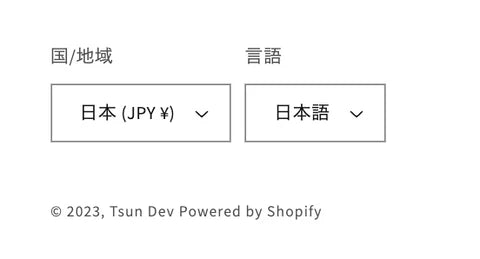
The blog article below introduces how to hide "Powered by Shopify." Please use it as a reference.

6 Ways to Identify a Shopify Site
Check the Source Code
This method checks whether keywords like "Shopify" or "shopify_theme" appear in the source code. If a site is built on Shopify, the source code is likely to contain keywords such as "Shopify" or "shopify_theme." Note that this method can also flag false positives — for example, a WordPress site with an embedded Buy Button may also contain "Shopify" in its source code.
Look for the Common Footer Link
As mentioned above, Shopify stores display a text link such as "Powered by Shopify" by default. Since many stores don't hide it, a site with "Powered by Shopify" in the footer is likely to be a Shopify store.
Check the Checkout Page
As mentioned above, Shopify's checkout page uses a common UI. You can identify whether a site is on Shopify by visiting its checkout page. Note that a WordPress site with an embedded Buy Button will also show Shopify's common checkout UI, so caution is needed here as well.
Check for Specific URL Patterns
As mentioned above, a store built on Shopify follows specific URL patterns. You can identify whether it's a Shopify store by checking whether product pages, collection pages, and blog posts follow URL patterns such as "domain/products/xxxx," "domain/collections/xxxx," or "domain/blogs/xxxx."
Please understand that this isn't a foolproof method, since it's possible to implement a site with the same URL patterns without using Shopify.
Use a Chrome Extension
You can use extensions such as "Wappalyzer," "Koala Inspector," or "Shopify Theme Detector" to identify whether a site is built with Shopify. We introduce recommended extensions for identifying whether a reference store is a Shopify store in the "Recommended Chrome Extensions" section below.
Check the Domain's DNS Records
This method involves investigating the DNS records of the reference store's domain.
Using a web service that lets you look up DNS records, check the reference store's domain and see whether its CNAME record lists "shop.myshopify.com," to identify whether it's a Shopify store.

3 Recommended Chrome Extensions
Koala Inspector

Source: Koala Inspector | Chrome Web Store
Koala Inspector is a Chrome extension specialized for analyzing Shopify stores. Using this extension, you can also investigate which Shopify theme a reference store uses and which Shopify apps it has installed. It's useful for finding areas to improve on your own store or for getting new ideas.
Wappalyzer

Source: Wappalyzer | Chrome Web Store
Wappalyzer is a browser extension that detects the technologies used on a website. It identifies the technology stack a website is built with, including content management systems (CMS), e-commerce platforms, web servers, JavaScript frameworks, and analytics tools.
Using Wappalyzer, you can not only investigate whether a reference store is using Shopify, but also find out what CMS or analytics tools it's using.
BuiltWith

Source: BuiltWith | Chrome Web Store
Like Wappalyzer, BuiltWith is a browser extension that detects the technologies used on a website. It lets you find out what technologies a website was built with.
How to Find Out Which Shopify Theme a Site Uses
Check with a Chrome Extension

Using "Koala Inspector," introduced above in "Recommended Chrome Extensions," you can find out which Shopify theme a reference store is using.
Check via Chrome DevTools

Open Chrome DevTools, and enter "window.Shopify.theme.schema_name" into the console to display the name of the Shopify theme in use. Entering "window.Shopify.theme.schema_version" will also display the version of the Shopify theme.
Check with a Web Service

Finally, here's how to use a web service. Without even installing a Chrome extension, you can find out which Shopify theme a reference store is using. Just visit one of the sites listed in [Web Services That Can Detect Your Shopify Theme] below and enter the reference site's URL into the input form.
Web Services That Can Detect Your Shopify Theme
Shopify Theme Detector by Koala Inspector
Shopify Theme Detector by PageFly
Summary
This article introduced three Chrome extensions useful for analyzing Shopify stores: "Koala Inspector," "Wappalyzer," and "BuiltWith." Using these extensions, you can investigate the Shopify theme, apps, and technology stack that a reference store is using.
We also introduced three ways to find out which Shopify theme a reference store is using: "using Chrome DevTools," "using a Chrome extension (Koala Inspector)," and "using a web service."
Using these methods, you can discover areas to improve on your own store and get new ideas.
Analyzing Shopify stores is essential for growing your own store. Please use the methods introduced in this article as a reference and actively analyze reference stores.


