

Some people hesitate to start selling online for a reason like, "I want to open an online store, but I'm worried the operating costs will become a heavy burden."
The e-commerce cart BASE offers a plan where no fees are charged until you start making sales. This means even those worried about the burden of operating costs can open an online store with peace of mind.
This article explains everything from BASE's features to the pros and cons of using it and its usage fees in detail. We also introduce its main features and case studies, so if you're curious about BASE, please read to the end.
What is BASE?

Image source: BASE
BASE is an online store-building service provided by BASE, Inc. With intuitive operation, you can easily create a professionally designed store. Along with the features needed to run an online store, it also comes with mechanisms that make products easier to sell.
Another distinguishing feature is that it offers a plan with no setup fee and no monthly fee. As of May 2026, the cumulative number of stores opened has surpassed 2.6 million, and it has ranked No. 1 in online store openings for eight consecutive years (according to a Macromill survey).
BASE's features
Here we explain BASE's features.
You can start an online store with no setup fee and no monthly fee
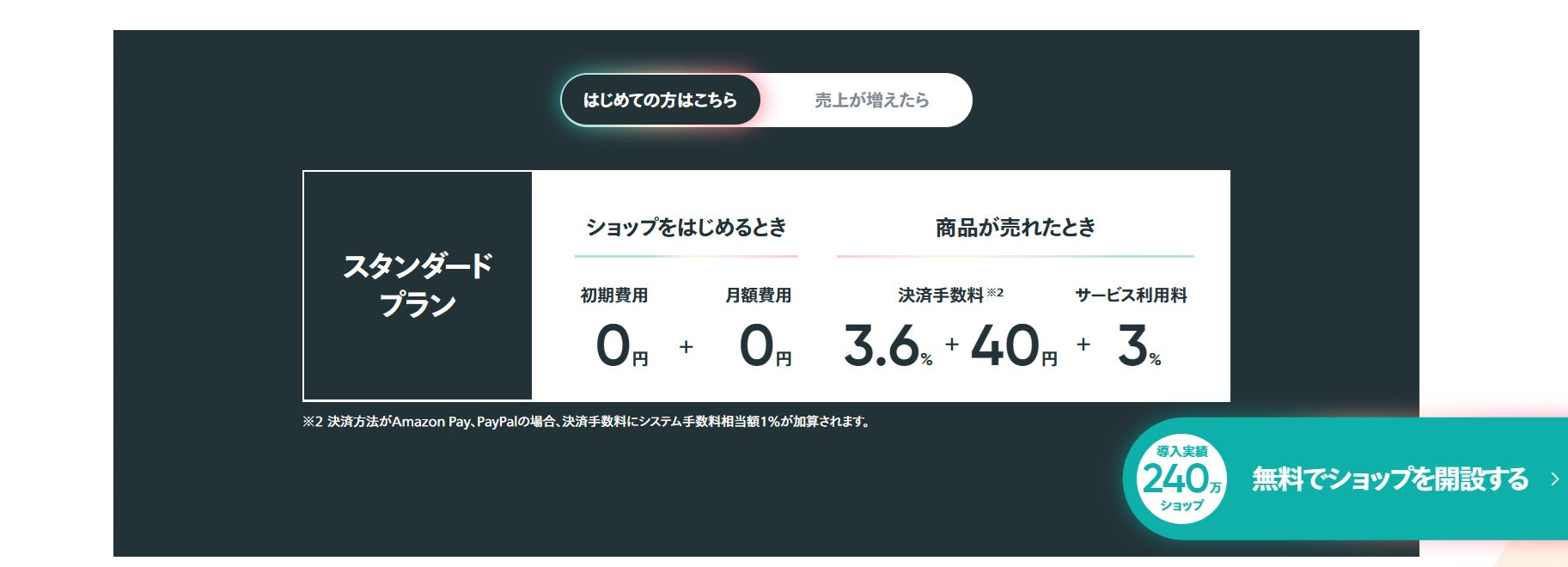
Image source: BASE
A major feature of BASE's Standard plan is that you can start an online store with no setup fee and no monthly fee. Since all you have to bear is the service fee and payment processing fee, you can run your store without worrying about running at a loss even when you have no sales.
You can make use of "PAY ID," which has 20 million registered IDs

Image source: PAY ID
With BASE, you can use "PAY ID," a shopping service for buyers with a cumulative 20 million registered IDs. PAY ID includes a "PAY ID app" that lets people browse products from stores built with BASE and follow their favorite stores.
A store opened with BASE can list its products in the PAY ID app. Since customers can discover products through the app, you can expect increased store awareness and new customer acquisition.
Note that listing products in the PAY ID app itself carries no listing fee, but orders placed through the PAY ID app incur different fees than orders placed through a regular BASE store.
*This information is based on details as of August 2026.
You can customize your store design with intuitive operation

Image source: BASE
BASE offers more than 100 highly designed templates. There are also design parts that let you customize text, images, featured products, and more via drag and drop, so you can create your store design with intuitive operation alone.
*This information is based on details as of August 2026.
You can add the features you need through extensions
Beyond basic features such as product management, order management, and design editing, BASE also offers a wide range of extensions (BASE Apps).
These include coupon issuance and email newsletter delivery that help boost sales, a subscription feature that enables recurring sales, and digital content sales for selling music, videos, and more. You can customize the features you need to match your store's situation.
The benefits of opening an online store with BASE
Here we introduce the benefits of opening an online store with BASE.
You can build a store easily, without specialized knowledge
BASE lets you use more than 100 design templates that make products look appealing, along with design parts that let you intuitively customize text, images, social banners, and more. Using a paid template created by a designer, you can easily produce a professional-looking store design.
This means you can build an appealing store that matches your brand's concept without needing specialized knowledge such as HTML or CSS.
You can start an online store without spending money
BASE's Standard plan can be used with no setup fee and no monthly fee, and no cost is incurred until a product sells. The only costs are the service fee and payment processing fee when a product sells, and the transfer fee when you receive your sales proceeds (¥250 per transfer; an additional ¥500 administrative fee applies if the payout request amount is under ¥20,000).
This means even those worried about the cost burden during periods with no sales can start an online store with peace of mind.
You can smoothly introduce a wide range of payment methods without integrating with external services
BASE offers "BASE Easy Payment," which lets you smoothly introduce a wide range of payment methods. Using BASE Easy Payment, you can adopt a total of eight payment methods at once: credit card payment, PAY ID pay-later, convenience store payment, bank transfer, carrier billing, PayPay, Amazon Pay, and PayPal.
Since you don't need a separate contract with each payment provider or complicated setup, you can focus on running your store.
Diverse customer-acquisition features and PAY ID make it easier to acquire new customers

Image source: BASE
Another benefit of BASE is that it has mechanisms that make it easier to acquire new customers.
BASE's extensions include several features that can drive traffic to your store from various platforms, such as Google Ads integration, Instagram Ads, and TikTok product integration.
Also, by opening a store with BASE, you can list your products in the "PAY ID" app, which has a cumulative 20 million registered IDs. Since customers can discover your products through in-app search and by following your store, you can expect to acquire new customers.
You can customize features as your store grows

Image source: BASE
BASE offers a wide range of extensions, and being able to customize features as your store grows is another appealing point. Available extensions include store rule-setting features such as delivery date settings, detailed shipping fee settings, and product search, as well as product rule-setting features such as digital content sales, lottery sales, and pre-orders — a diverse lineup of features.
Even when running your store on basic features alone becomes difficult, you can use extensions to build a store equipped with the features you need.
Also, while some apps involve a paid app fee or in-app purchases, many apps are available for free. With other EC carts, it's often the case that you can't add a needed feature without integrating with an external service, or that doing so incurs costs such as a setup fee or monthly fee. This makes being able to add features at low cost a major advantage of BASE.
The drawbacks of using BASE to open an online store
BASE is a service that lets you start an e-commerce site without specialized knowledge and without spending money. On the other hand, there are also some drawbacks to using it.
Here we explain the drawbacks of using BASE to open an online store.
As sales grow, the fees become a significant burden
On the Standard plan, which has no setup fee and no monthly fee, you pay a 3% service fee plus a 3.6% + ¥40 payment processing fee. This isn't an issue while sales are low, but as sales grow, the service fee and payment processing fee can become a significant burden.
BASE's official help center indicates that around ¥500,000 in monthly sales is a rough break-even point for switching plans. As your sales approach this level, consider switching to the Growth plan, which has no service fee and a lower payment processing fee.
*This information is based on details as of August 2026.
The Growth plan incurs a monthly fee

Image source: BASE
The only way to run BASE for free is by using the Standard plan.
The Growth plan has no setup fee and a lower payment processing fee, but it costs ¥16,580 per month (the monthly rate when converted from annual billing). So if you use the Growth plan before your sales have grown, the monthly fee could become a significant burden.
While your sales are still low, we recommend using the Standard plan, which has no operating cost.
*This information is based on details as of August 2026.
There are limits to the design you can build without specialized knowledge
While a benefit of BASE is that you can customize your store design without specialized knowledge, the range of what you can easily customize is limited.
If you want a design polished down to the smallest detail, you'll need to edit HTML, CSS, and JavaScript.
Achieving a truly one-of-a-kind design based on your store or brand's concept is difficult without specialized knowledge.
A growing online store may find the features lacking
Because BASE's defining feature is how easily you can create an online store, its basic features are limited to the minimum needed to run an e-commerce site.
Extensions called "BASE Apps" are also available, but some other EC carts offer well over a thousand, even up to ten thousand, apps. So as your online store grows, you may find BASE's features lacking.
For a store like this, we recommend using "Shopify," which offers a much wider range of features. Shopify has a lineup of more than 16,000 diverse apps, making it easy to optimize your features as your store grows.
If your online store is growing and you're torn between Shopify and BASE, please see the article below.

The steps for migrating from BASE to Shopify are explained in the following article.

BASE's usage fees
BASE's usage fees are as follows.
| Pricing plan | Standard plan | Growth plan |
|---|---|---|
| Setup fee | ¥0 | ¥0 |
| Monthly fee | ¥0 | ¥19,980 *monthly billing ¥16,580 *monthly rate under annual billing |
| Service fee | 3% | ¥0 |
| Payment processing fee | 3.6% + ¥40 / 4.6% + ¥40 | 2.9% / 3.9% |
| Transfer fee | ¥250 per transfer | ¥250 per transfer |
| Administrative fee | ¥500 *If the payout request amount is under ¥20,000 |
¥500 *If the payout request amount is under ¥20,000 |
*The payment processing fee varies by payment method.
Source: BASE
On the Standard plan, the only costs are the service fee and payment processing fee, so you can use it for free until a product sells. The Growth plan costs ¥16,580 per month, but since its service fee and payment processing fee are lower, you can keep costs down once products start selling.
We recommend the Standard plan while your sales are low, and switching to the Growth plan once your sales grow.
*This information is based on details as of August 2026.
BASE's standard features
BASE's standard features are as follows.
| Feature | Description |
|---|---|
| Product management | A feature for registering products and managing inventory |
| Design editing | A feature for editing your design theme, background, logo, parts, and more |
| Customer management | A feature for managing customer information in a list |
| Money management | A feature for managing your sales balance, deposit/withdrawal history, and payout request history |
| Data analysis | A feature for analyzing trends in sales, order counts, per-product page views, and more |
The standard features include everything you minimally need to build and run an online store. This means you can move smoothly from building your store all the way through running it.
*This information is based on details as of August 2026.
BASE's handy extensions (Apps)
BASE offers extensions that are handy for running an online store. The main extensions are as follows.
| Feature category | Features |
|---|---|
| Store rule-setting features | Secret EC Delivery date settings Custom domain Detailed shipping fee settings English/foreign currency support Age restriction Product search Block list TikTok Shop integration |
| Product rule-setting features | Category management Digital content sales Quantity limits Labels Subscriptions Pre-orders Lottery sales Sales period settings Product options Takeout |
| Store design features | Hide BASE logo Store logo creation HTML editing Add pages Announcement banner |
| Product preparation/creation features | Remo Photo by COLORFULLY Original Print.jp monomy |
| Order management/shipping features | Bulk shipping label printing Order data download Delivery slip download Shipping label data download CSV bulk shipping Dambo-ru One canai Address printing by labelmake.jp Ship&co TEMPOSTAR Starter plan Next Engine CROSS MALL NEOlogi Logimo Pro Product storage, packing, and shipping proxy service |
| Customer-acquisition features | SEO settings Blog TikTok product integration/ads YouTube & Google integration Instagram Ads CAMPFIRE integration note store Press release distribution by ValuePress! |
| Sales-boosting features | Membership Coupons Email newsletter Reviews Sales Custom product descriptions Instagram sales Omise Connect |
| Store issue analysis features | HTML tag management Ad performance measurement Google conversion tag setup Surveys |
| Operational efficiency features | Staff permission management Product codes Messages Sales data download CSV product management Automatic restock notifications Sourcing site Super Delivery Overseas sales proxy service THE CKB: Sourcing/Production/Shipping Manager Taobao Shinkansen orosy NAWABARI ChatPlus Smaregi inventory integration Square integration |
| Money management features | Scheduled transfers Fraudulent payment guarantee Sales management by freee Sales management by Money Forward |
| Other | Community Custom design business cards |
By using extensions, you can encourage existing customers to make a purchase through approaches such as issuing coupons, setting sale prices, and sending email newsletters.
You can also integrate with TikTok, Instagram, Google, and more, giving you a good chance of attracting new customers. There's also a full lineup of features that boost operational efficiency, such as features that add more ways to sell — like subscriptions and pre-orders — and features that bulk-register products or automatically send restock notifications.
Using extensions can help you run an online store that delivers even better results.
*This information is based on details as of August 2026.
The blog article below introduces how to set up subscriptions and a blog on BASE. Please use it as a reference.

How to open a store on BASE
With BASE, you can open an online store in the following seven steps.
- Create an account on BASE
- Complete email address verification
- Set up your store's operator information
- Set up payment methods
- Register products
- Set up your store design
- Publish your store
First, visit BASE's official site and create an account by entering your email address, password, and store URL.
Next, check the email sent to your registered email address and enter the verification code. After completing email address verification, you'll move on to setting up the operator information required under Japan's Act on Specified Commercial Transactions. Check the details of each item and fill in what's needed.
Next, apply to use "BASE Easy Payment" and set up the payment methods your store will use. BASE supports multiple payment methods, including credit cards, convenience store payment, bank transfer, and PayPay.
Once your payment settings are complete, register your products from the product management screen. Set your product name, description, images, price, shipping fee, and more. Finally, set up your store design, and once everything you need is set up, publish your online store.
BASE case studies
Here we introduce some case studies of BASE in use.
Seika Mikotoya

Image source: micotoya
Seika Mikotoya is an online store selling naturally cultivated vegetables and fruit. It adopted BASE because the platform is set up to make operations easy. Since opening its online store on BASE, it has achieved stable sales throughout the year.
Macha Cameras

Image source: Macha Cameras
Macha Cameras is an online store selling retro cameras. It originally sold items one at a time on a flea-market app, but moved to BASE, which requires little upfront investment or effort to build a site.
Macha Cameras continues to use BASE today, running its online store with a light operational burden.
TOKYO COWBOY

Image source: TOKYO COWBOY
TOKYO COWBOY is an online store specializing in fully custom-cut Wagyu beef. It liked BASE's attentive support and opened its online store using BASE.
70% of the online store's customers are repeat customers, and the share of sales coming from BASE compared to its physical store has been gradually growing.
BASE is a great fit for anyone who wants to start an online store without spending money
BASE is an EC cart that lets you start building and running an online store with no setup fee and no monthly fee. With more than 100 templates and design parts, you can create an online store through intuitive operation alone, with no specialized knowledge required.
It also offers extensions that help with customer acquisition, sales growth, operational efficiency, and more, letting you customize features to match your store's situation. You can even list your products in the "PAY ID" app, which has a cumulative 20 million registered IDs, making it a reassuring service for customer acquisition too.
If you want to start an online store while keeping costs as low as possible, consider using BASE.


