

"What is Shopify Markets?" "I want to know how to sell overseas with Shopify."
Many merchants have questions like these. "Shopify Markets" is Shopify's official feature that makes international expansion (cross-border e-commerce) possible.
This article explains what Shopify Markets is, what it can do, and walks through the actual setup steps in detail. If you're considering expanding overseas with Shopify, be sure to use this as a reference.
What Is Shopify Markets?
Shopify Markets is a built-in feature for expanding internationally (cross-border e-commerce) with Shopify, enabling you to sell to multiple countries and regions.
This feature lets you finely tune how your store is "presented" to customers for each country or region you want to sell to. For example, you can customize things like "displaying the site in English for U.S. customers and having them pay in U.S. dollars." Optimizing your store to match the local language, currency, and culture like this is called "localization." Localization allows you to provide a comfortable shopping experience for overseas customers, which can drive business growth.
It can also be used for strategic marketing purposes, such as "selling a product exclusively in Asia that isn't sold in Japan."
For more on how to get started with cross-border e-commerce on Shopify, refer to the blog article below.

Differences in Shopify Markets by Plan
Shopify Markets is available free of charge on every plan. However, some features are only available on higher-tier plans. The main differences are as follows.
| Plan Name | Starter | Basic | Grow | Advanced | Plus |
|---|---|---|---|---|---|
| Create markets | ◯ | ◯ | ◯ | ◯ | ◯ |
| Number of markets you can create | 3 | 3 | 3 | 50 | 50 |
| Create product catalogs | ◯ | ◯ | ◯ | ◯ | ◯ |
| Domain and language customization | ◯ | ◯ | ◯ | ◯ | ◯ |
| Manage currency, duties, and taxes per market | ◯ | ◯ | ◯ | ◯ | ◯ |
| Theme customization tailored to a market |
— | — | — | ◯ | ◯ |
| Create a B2B market | — | — | — | — | ◯ |
※This information is based on data as of June 2025.
The blog article below explains each Shopify plan in detail. Please use it as a reference.

Shopify Markets Terminology
Shopify Markets has several specialized terms. Here's what each one means.
Market
A group of customers grouped together from a specific country or region. Think of it as offering a differentiated store for each country or region, like an "Asia market" or "United States market."
For each of these "markets," you can optimize the displayed language, currency, products sold, product pricing, and even the store design.
Parent Market
A larger group setting that combines multiple countries or regions. You can create a template that serves as the foundation for settings under a broad grouping such as "North America" or "Europe."
For example, if you configure currency and design settings under a parent market called "Europe," you can efficiently manage the settings of the countries within it.
Sub-Market
A more specific setting for an individual country or region created within the larger parent market group. It functions as a "child" of the parent market.
Since a sub-market inherits the settings of its parent market, there are fewer items to configure, making fine-tuning per country easier.
Inheritance
The process by which a parent market's settings are automatically "carried over" to the sub-markets within it.
For example, the currency, language, and products for sale (catalog) set for "Europe" (parent market) are automatically applied to "France" (sub-market) within it. Of course, after inheriting these settings, you can still make individual changes afterward, such as "make France's storefront French only" or "offer a 20% discount on prices in France." It's a convenient mechanism that greatly reduces the setup workload.
Catalog
A "list of products to sell" for a specific market.
You can configure detailed sales strategies per market, such as "sell this product only in Japan" or "sell this T-shirt at a 10% markup in Europe."
What You Can Do with Shopify Markets
Here's an explanation of what you can do with Shopify Markets.
Localize the Store's Language and Currency
You can automatically switch the language and currency displayed on your store to match the customer's country. This eliminates the "language barrier" and "confusing pricing" that overseas customers often feel, allowing them to shop with peace of mind, which can be expected to improve conversion rates.
SEO Enhancement Through Country/Region-Specific Domain Settings
You can set up a dedicated website address (domain) for each country or region you sell to. For example, if you set "yourstore.jp" for Japan and "yourstore.com" for the United States, search engines will correctly recognize that "this site is intended for a specific country."
As a result, your site is more likely to rank higher in each country's search results (SEO enhancement), which can be expected to increase access from customers. It also gives customers a sense of reassurance that this is an official site meant for their own country.
If you acquire a domain for each country or region, you'll incur an annual domain fee for each domain.
Product Catalog Management by Market
"Catalog" is the feature that lets you freely manage "which products are sold in which country" on a per-market basis. For example, you can make strategic settings such as "sell this product only within Japan" or "pre-release this new product only in Europe."
This allows you to offer an optimal product lineup that matches the laws, culture, and demand of each country. It also helps prevent customer confusion, since products not intended for sale won't be displayed in the store.
Flexible Price Adjustments by Country
Even for the same product, you can set individual selling prices tailored to the country or region you're selling to. Since costs such as shipping and duties vary by country in overseas sales, you can add these costs on top of the price or adjust prices to match local price levels.
This allows you to secure solid profits in each market while offering customers competitive prices, enabling a more strategic approach to international expansion.
Shopify Markets Setup Steps
Here's an explanation of the Shopify Markets setup steps.
Select "Markets" in the Shopify admin. Click "Create market."

The screen for creating a new market appears. Enter a name for the market in "Name," and click "Add condition."

Select the countries or regions to include in the market, and click "Done."

The market has now been created.

Inheritance Settings
Next, configure the inheritance settings. Inheritance settings are carried over to sub-markets. The items are as follows.
- Currency: The currency displayed for this market
- Catalog: The products sold in this market
- Online Store: The site design displayed for this market
- Domain/Language: The domain and language used for this market
- Duties and Taxes: The duties and taxes applicable in this market

The store's default settings are reflected, but you can change them by clicking the "+".
Under "Currency," you can set the type of currency displayed for the market, "price rounding," and the "exchange rate."

"Catalog" is explained in detail in the next section.
Under "Online Store," you can customize the theme exclusively for this market.

Under "Domain / Language," you can set the domain and language for each market.

Under "Duties and Taxes," you can select how "sales tax" and "duties and import taxes" are collected, along with the "tax display" method.

Creating a Catalog
Register the products sold in the market as a "catalog." By default, this is set to "all products," so use this when you want to exclude certain products or change prices for sale.
Click the "+" next to Catalog, then click "Create catalog" when it appears. A screen like the one below will be displayed.

Give the catalog a clear, easy-to-understand title.
The pricing-related items are as follows.
- Currency for set prices
- Overall price adjustment
- Price before discount
The default for "Currency for set prices" is the store's currency, but it can be set to the local currency.
※To change the currency, you need to adopt Shopify Payments and support multiple currencies.
Next is the "Products" item. By default, all products in the store are eligible for sale. If you want to exclude a product, check the relevant product and click "Exclude from catalog."

A confirmation for exclusion will be displayed, so click "Exclude products."

Excluded products can be restored at any time from the "Excluded" tab. Once you're finished with the settings, click "Save."

Other Settings
The other settings include the following items.
- Shipping
- Price before discount
- Customer privacy

"Shipping" is explained in detail in the blog article below, so please refer to it.
The European Economic Area (EEA) has special laws regarding the display of product prices. Because of this, this item for managing "price before discount" is only displayed when a target country is in the EEA. If you need to comply with local laws, hide the pre-discount price using this item. For more details, refer to Shopify's help page.
"Customer Privacy" lets you configure things like your privacy policy, cookie banner, and data-sharing opt-out page. For more details, refer to Shopify's help page.
Creating a Sub-Market
Creating a sub-market is easy. Click "Create market" again, and select a country or region that belongs to the parent market as the target. In this example, we selected "France," which belongs to the parent market "Europe," as the target country.
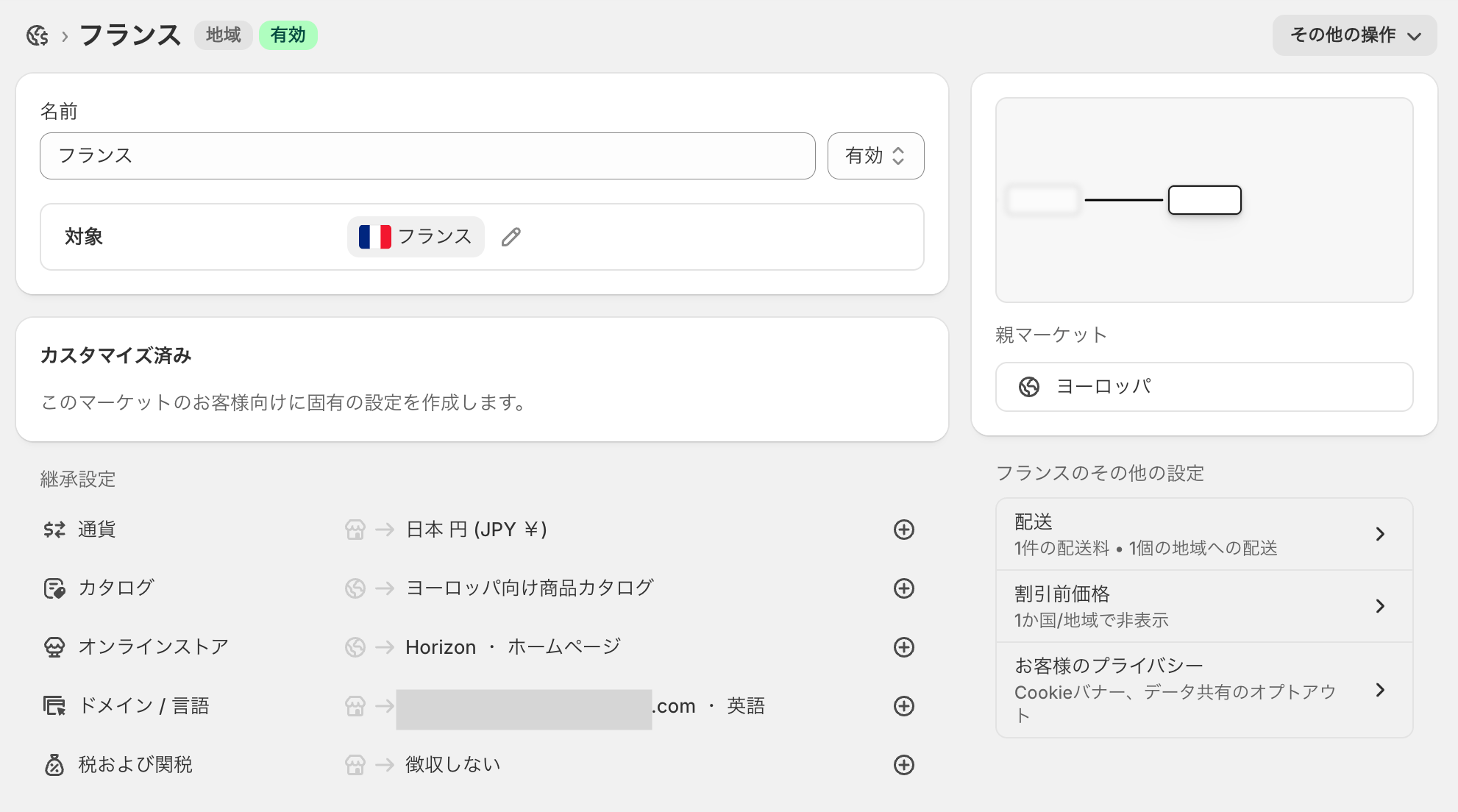
Just doing this will reflect the parent market's settings in the inheritance settings. If you want to configure settings unique to the sub-market, click the "+" to the right of the setting item and make your changes.
Use Shopify Markets to Deliver Your Products to Customers Around the World
This article explained the overview of Shopify Markets and its setup steps.
Shopify Markets is a reliable feature that significantly lowers various hurdles to international expansion. By overcoming barriers like language, currency, and country-specific rules, you can provide an optimal purchasing experience to customers all over the world.
Use this article as a reference, and leverage Shopify Markets to deliver your products to customers around the world.


