

The Shopify marketing app "Candy Rack" lets you implement a wide range of upsell and cross-sell features on your store. Among store operators who "want to boost sales," many may be curious about it.
"What can Candy Rack do? What are its pros and cons?"
"Show me how to use Candy Rack"
Reading this article will answer questions and needs like these.
Provided by a Czech company, Candy Rack is an app specialized in upselling and cross-selling and is easy to operate. It can also automatically generate offers (upsell and cross-sell suggestions) using AI.
Reading this article will help you find hints as to whether Candy Rack is a good match for your store. Please use it as a reference.
What Is the Shopify Upsell/Cross-Sell App "Candy Rack"?

Image source: Candy Rack|Shopify App Store
"Candy Rack" is an app that implements upsell and cross-sell features on a Shopify store, supporting increased store sales. It suggests highly relevant products at various points in the customer's purchasing process, such as the product page, cart, and checkout page. This lets you efficiently approach prospective customers, and can be expected to increase the average purchase amount per customer.
Setup and configuration are simple, and no specialized web knowledge is required. It should be easy to use with confidence, even for those new to running a store.
Candy Rack's Main Features and What It Can Do
Here are Candy Rack's main features and capabilities.
A Wide Range of Upsell and Cross-Sell Features
Candy Rack's biggest strength is its ability to make upsell and cross-sell offers at various stages of the customer's purchasing process.
For example, while a customer is browsing a specific product, it can show related products; when a product is added to the cart, it can show items that are convenient to buy together; and even after checkout is complete, it can display additional recommendations in a "how about this too?" style.
These offers are mainly displayed in pop-up form, making them easy to catch the customer's eye, and can naturally encourage additional purchases or upgrades to higher-priced items, contributing to a higher purchase amount.
The upsell and cross-sell features Candy Rack can implement are as follows:
- Upsell suggestions: suggests higher-featured, higher-priced products, or highly related products compared to the one being viewed.
- Cross-sell suggestions: suggests accessories or complementary items that tend to be purchased together with the product in the cart.
- One-click upsell: presents a special offer that customers can easily add with a single click.
- Product bundles (set sales): suggests combining multiple products into a discounted bundle, encouraging bulk purchases.
- Quantity discounts (volume discounts): offers a discount based on the number of the same product purchased.
- BOGO (buy one, get one): runs promotions in the format "buy a specific product and get another product free or discounted."
- Gift suggestions: offers incentives such as "get a free gift with purchases over a certain amount."
- Additional service suggestions: proposes value-added services such as gift wrapping, extended warranty, or priority shipping.
※ This information is based on data as of June 2025.
The blog article below introduces the basic concepts of upselling and cross-selling, along with practical methods and points to note. Please use it as a reference.

AI-Based Product Recommendations
Candy Rack comes with an AI-powered product recommendation feature that supports more efficient store operations. This feature automatically selects the optimal upsell/cross-sell target products for a trigger product, in the style of "people who viewed this also like this" or "this is often bought together with this product."
This reduces the effort store owners would otherwise spend manually selecting and configuring products one by one.
Freely Customizable Design and Display Rules
With Candy Rack, you can flexibly customize the design of the pop-up that presents upsell and cross-sell offers to match your store's brand image. In addition to layout, colors, and text content, you can also finely configure display rules, such as which offer to prioritize.
This lets you appeal products in a way that blends naturally into your store's atmosphere, without feeling out of place to customers.
Benefits of Adding Candy Rack to Shopify
Here are 4 benefits of adding Candy Rack to Shopify.
Increased Customer Value and Sales
Candy Rack's biggest benefit is raising the amount spent per customer (customer value) through upselling and cross-selling. By effectively suggesting related products, higher-grade products, or attractive bundles, customers are more likely to make an additional purchase, directly leading to increased sales for the store overall.
Improved Customer Satisfaction
An appropriately personalized product suggestion is "useful information" for the customer. By learning about related products they hadn't noticed, or higher-tier products or bundles that better fit their needs, customers get a more satisfying shopping experience.
This improved customer satisfaction encourages repeat purchases and can also contribute to acquiring new customers through favorable word of mouth.
Improved Operational Efficiency
Using the AI-based product recommendation feature significantly reduces the effort of manually setting up related products. This lets store owners spend more time on other important tasks, such as marketing activities and product development.
Diversified Promotions
Beyond suggesting related or upgraded products, Candy Rack also enables a variety of promotions, including product bundles, quantity discounts, and gift settings. You can easily test "which promotion suits our store best?", widening your range of promotional options.
Candy Rack's Drawbacks
While Candy Rack is very useful, it does have a few drawbacks.
Insufficient Features Beyond Upsell/Cross-Sell
Marketing tactics for e-commerce sites cover a wide range. It's common to aim for overall sales growth through various tactics, but since Candy Rack is specialized in upselling and cross-selling, its other marketing features are limited.
For example, it can't do discounts based on customer information (such as member discounts) or offer benefits based on past purchase history. It also lacks features such as limiting the number of times a campaign can be used.
If you also want to implement marketing tactics beyond upselling and cross-selling, note that you'll need to add another app, which could increase your running costs.
Support Is Overseas
Candy Rack is an app provided by a company in the Czech Republic. While its operating screen supports Japanese, there is no dedicated Japan desk.
Therefore, for chat and email support in case of questions or issues, you'll likely need to communicate in English. Please be aware of this if you're not comfortable with English.
Candy Rack Pricing Plans
Candy Rack's pricing varies based on the number of monthly orders. There's no difference in features based on the fee paid. The relationship between monthly order count and monthly fee is shown in the table below.
| Plan Name | Monthly Orders | Monthly Fee |
|---|---|---|
| Starter | 0–200 | $39.99 |
| Growth | 201–500 | $59.99 |
| Scale | 501–1,000 | $79.99 |
| Advanced | 1,001–2,000 | $149.99 |
| Pro | 2,001–3,000 | $199.99 |
| Premium | 3,001–5,000 | $299.99 |
| Elite | 5,000–9,999 | $399.99 |
| Enterprise | 10,000+ | Custom quote |
What's included
- 6 upsell display positions
- AI-based upsell suggestions
- Unlimited orders and sales generated through upsells
- 24/7 chat and email support
※ This information is based on data as of June 2025.
Candy Rack offers a 14-day free trial. If you're interested, it's a good idea to try it out.
How to Set Up and Configure the Shopify App Candy Rack
Here's how to set up Candy Rack.
First, install "Candy Rack" from the Shopify App Store.
Image source: Candy Rack|Shopify App Store
Your Shopify store will show an install confirmation again, so click "Install."

Image source: Shopify admin
Once the install is complete, follow the setup guide to do the initial configuration. First, click "Enable" under "Enable Candy Rack in the theme editor."

The theme editor will appear automatically, so enable the "Candy Rack" switch and click "Save."

Next, check how the offer behaves.
Click "Enable offer" under "Set up your first upsell offer." This lets AI automatically create an offer for you.
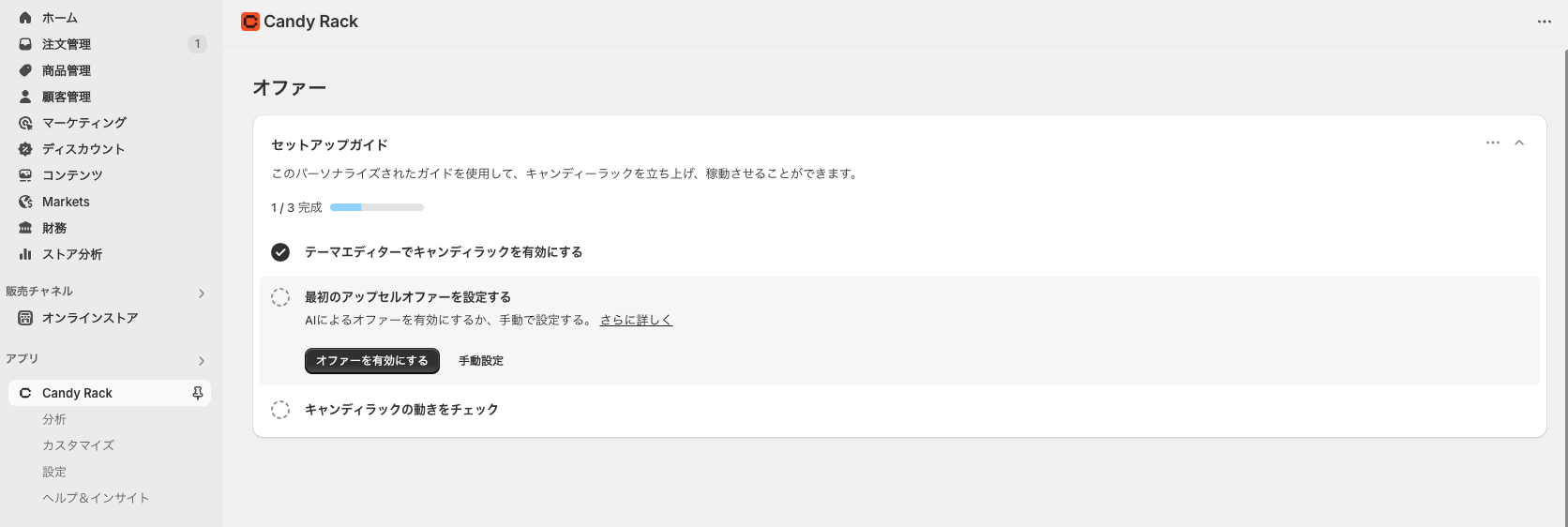
Finally, click "Go to store" under "Check how Candy Rack works" to view your online store.

Initial setup is complete once the offer pop-up appears when a product is added to the cart.

You can change the status of an AI-created offer to "Disabled" from the admin.

Specific Usage of the Shopify App Candy Rack
Here's how to specifically use Candy Rack.
On the Candy Rack home screen, click "Create offer."

The "Create upsell offer" page will appear. Setting items are shown on the left, and a preview is shown on the right.

The main setting items are as follows. Items change depending on your selections along the way.
- Offer name: the internal offer name (not shown to customers)
- Placement: where the offer is displayed
- Product page
- Cart page
- Checkout (Shopify Plus only)
- Post-purchase
- Display: select the products or collections that trigger the offer
- All products
- Specific products
- Specific collections
- Upsell type: select how the target product for the offer is chosen
- AI mode: automatically selected by AI
- Manual mode: manually select the offer product
- Same product: targets the same product as the trigger product
- Custom service: suggests services such as gift wrapping or extended warranty
- Description: write the offer's description (pitch) for customers
- Discount: apply a discount to the upsell product. Discount rate or discount amount
- Additional settings: set things like display priority when there are multiple offers
If you select "AI mode" for upsell type, AI will automatically generate which product to suggest.
Once configured, click "Save."
Let's check it on the actual screen. In this sample, purchasing shoes triggers a cross-sell offer for a T-shirt at 1,000 yen off.
Adding the shoes to the cart displayed a pop-up showing the T-shirt at a discounted price.

Clicking "Add" adds the T-shirt to the cart. Navigating to the cart page by clicking "Continue" confirmed that the T-shirt was added to the cart at the discounted price.

That covers the specific usage instructions.
Adopt an Upsell/Cross-Sell App and Aim to Boost Your Sales
This article explained Shopify's upsell/cross-sell app "Candy Rack."
Candy Rack is an app that also supports Japanese, and lets you start upsell and cross-sell tactics with simple configuration. On the other hand, its features are limited, and if you want to run comprehensive marketing tactics, you may need to adopt other apps as well.
If you feel that "the tactics Candy Rack offers are enough," please go ahead and adopt it and aim to boost your sales.


