

Note: This article covers FC2 Shopping Cart, an e-commerce platform available only in Japan. This will not be relevant if you are not evaluating platforms for the Japanese market.
Among those setting up an e-commerce site for the first time, some may be thinking, "I want to run my online store while keeping costs as low as possible," or "I want to sell digital content."
FC2 Shopping Cart is an e-commerce platform that enables low-cost store operation, with zero setup fee, monthly fee, and sales commission.
This article explains everything from an overview of FC2 Shopping Cart to its main features and pricing plans in detail. We also cover its pros and cons and the characteristics of who should use it, so if you're curious about FC2 Shopping Cart, please read through to the end.
What Is FC2 Shopping Cart?

Image source: FC2 Shopping Cart
FC2 Shopping Cart is an e-commerce platform you can start with no setup fee, monthly fee, or sales commission. It provides the minimum features needed to build and run an online store, and more than 230,000 shops have opened e-commerce sites with FC2 Shopping Cart to date.
With FC2 Shopping Cart, you can start selling as soon as you set up your shop's design and product settings after signing up. After registering with FC2 Shopping Cart, you can begin selling products simply by setting your shop's design and registering your products and shipping fees. This makes it a perfect fit for anyone who wants to start selling on an e-commerce site right away.
Benefits of Using FC2 Shopping Cart
Here, we explain in detail the benefits of using FC2 Shopping Cart.
You Can Run an Online Store for Free
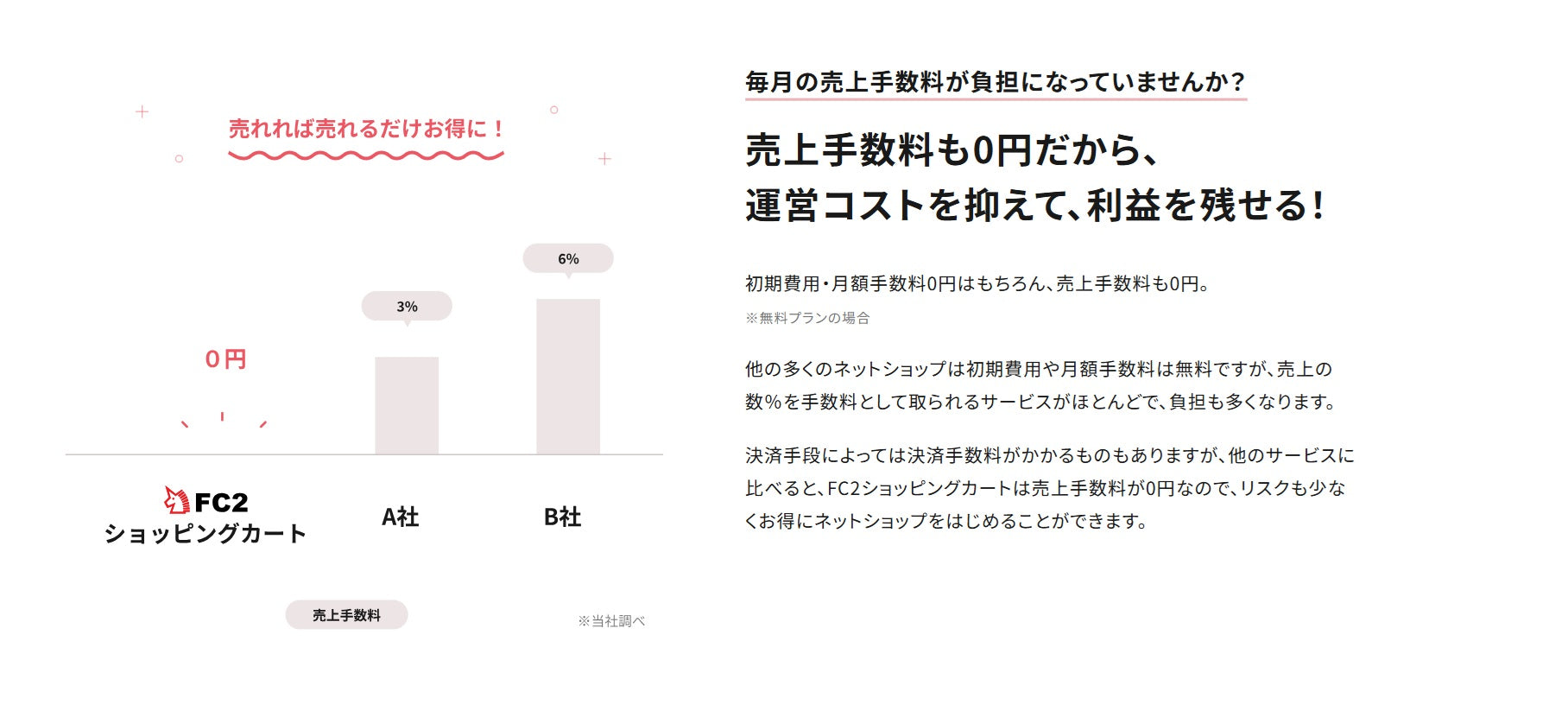
Image source: FC2 Shopping Cart
With FC2 Shopping Cart's free plan, a major benefit is being able to run an online store for free. Setup fees, monthly fees, and sales commissions are all zero. There are no extra costs, whether when you first start your online store or even after your sales grow.
With other e-commerce carts, even when setup fees and monthly fees are free, a sales commission is often charged. This means that using FC2 Shopping Cart lets you run your shop at low risk while keeping more of your sales profit.
You Can Sell Digital Content

Image source: FC2 Shopping Cart
Another appealing feature of FC2 Shopping Cart is that it lets you sell digital content as downloads. You can easily sell digital content such as your own programs, videos, photos, music, and e-books.
As long as you stay within your disk space allowance, there's no limit to the number of products you can sell as downloads. It's recommended for shops that want to primarily sell digital content such as music and video, rather than physical products like food, general goods, or appliances.
You Can Also List Your Shop on FC2 Shopping Mall

Image source: FC2 Shopping Mall
Online stores opened with FC2 Shopping Cart can also be listed on FC2 Shopping Mall. FC2 Shopping Mall is a marketplace that gathers together shops opened with FC2 Shopping Cart.
The shopping mall includes features such as listings of new and popular products and a search function by product category. Because each shop gets its own portal page, it becomes easier to get your online store noticed by more customers.
Drawbacks of FC2 Shopping Cart
Here, we explain the drawbacks of using FC2 Shopping Cart.
There Are Limits on Digital Content Sales
For digital content sales on FC2 Shopping Cart, you cannot sell content that exceeds your disk space allowance.
Disk space varies by plan: up to 500MB on the Free Plan, up to 4GB on Pro Plan 1, and up to 100GB on Pro Plan 2.
For example, if a single file is 1GB, you can sell a maximum of only 100 of them. Keep in mind that this isn't suited for selling large volumes of digital content.
Most Design Templates Are Simple
FC2 Shopping Cart offers 64 design templates, but most of them are basic in design. There are only a handful of stylish templates that make products look appealing.
As a result, if you use a design template as-is, it's quite likely to be difficult to achieve your ideal shop design.
If you don't have specialized knowledge but still want to be particular about your shop's design, we recommend using a different e-commerce cart.
Fees for Using FC2 Shopping Cart
FC2 Shopping Cart offers three pricing plans: the Free Plan, Pro Plan 1, and Pro Plan 2. The details of each plan are as follows.
| Pricing Plan | Free Plan | Pro Plan 1 | Pro Plan 2 |
|---|---|---|---|
| Monthly Fee | Free | ¥750 | ¥6,600 |
| Setup Fee | Free | ¥2,500 | ¥10,000 |
| Sales Commission | Free | Free | Free |
| Disk Space | 500MB | 4GB | 100GB |
| Number of Products | Unlimited | Unlimited | Unlimited |
| Download Sales | 〇 | 〇 | 〇 |
| Download Product Capacity | Unlimited (within disk space allowance) |
Unlimited (within disk space allowance) |
Unlimited (within disk space allowance) |
| Custom Domain | 〇 | 〇 | 〇 |
| Email Address | 〇 | 〇 | 〇 |
| Easy Favicon Setup | 〇 | 〇 | 〇 |
| Email Newsletter | × | 〇 | 〇 |
| Sales Data Download | 〇 | 〇 | 〇 |
| Smartphone Support | 〇 | 〇 | 〇 |
| HTML/CSS Editing | 〇 | 〇 | 〇 |
| Bulk Product Registration (CSV) | 〇 | 〇 | 〇 |
| Free Page Creation | 〇 | 〇 | 〇 |
| Credit Card Payment | 〇 | 〇 | 〇 |
| SSL | 〇 | 〇 | 〇 |
| Support (Email) | 〇 | 〇 | 〇 |
Reference: FC2 Shopping Cart
The Free Plan is the only one where you can run your shop with zero setup fee, monthly fee, and sales commission. The other plans incur setup and monthly fees.
There isn't a big difference in available features, but the disk space allowance for digital content sales varies significantly. If you plan to sell digital content as your main offering, we recommend choosing a Pro Plan rather than the Free Plan.
Main Features of FC2 Shopping Cart
FC2 Shopping Cart comes with the minimum features needed to build and run a shop, including shop design settings, shipping settings, coupon issuance, and order/sales management.
Here, we introduce the main features divided into five categories: shop features, management features, product features, design features, and promotional features.
Shop Features
| Feature Name | Details |
|---|---|
| Cash-on-delivery fee | A feature that lets you set fees by purchase amount (up to 7 tiers) |
| Shipping method settings | A feature that lets you set shipping methods (up to 10) |
| Review settings | A feature that lets customers post product reviews |
| Coupon issuance | A feature for issuing discount coupons, percentage-off coupons, and shipping coupons |
| Credit card payment | A feature that lets you set up PayPal and various credit card payments |
| Shop member rank | A feature that lets you assign ranks to shop members |
| Shop member points | A feature that lets you set point accrual and usage limits for shop members |
| Order history | A feature that lets you view past order history |
| Age verification | A feature that sets an age-verification page for products requiring age confirmation |
| SSL support | A feature that enables SSL for your shop |
| Per-product SEO support | A feature that lets you apply SEO measures for each product |
Product features include the ability to configure product shipping, issue coupons, and set member-only discount rates and point accrual.
Management Features
| Feature Name | Details |
|---|---|
| Order management | A feature for checking order details and tracking payments and shipments |
| Order search | A feature that lets you filter and search order information |
| Sales management | A feature that lets you check sales by day, month, or year |
| Sales data download | A feature that lets you download sales data in CSV format |
| Delivery note issuance | A feature for issuing and printing delivery notes per order |
| Import/export | A feature for importing/exporting product, category, and member data |
| Access analytics | A feature that lets you check the number of visits to each product page |
Management features include order/shipping management and sales management. There's also a feature that lets you check per-product visit counts for up to three months, which is useful for marketing as well.
Product Features
| Feature Name | Details |
|---|---|
| Member-only products | A feature that lets you set products for sale only to members who are logged into the shop |
| Inventory settings | A feature for setting product stock quantities |
| Price by variation | A feature that lets you set prices by product variation, such as size or color |
| Multiple category selection | A feature for setting categories for products |
Product features let you set stock quantities and prices by variation, such as size and color. You can also set up exclusive products that only shop members can purchase.
Design Features
| Feature Name | Details |
|---|---|
| Quick Design | A feature that lets you easily change your shop's design |
| Design templates | A feature that lets you edit HTML/CSS to create your own custom design |
| Smartphone support | A feature that optimizes display for smartphones |
| Custom pages | A feature for creating free-form pages |
These are features you can use to design your shop. There are 64 design templates available, which you can use as-is or customize by editing HTML/CSS. Using Quick Design, you can easily change your design even without knowledge of HTML or CSS.
Promotional Features
| Feature Name | Details |
|---|---|
| Email newsletter delivery | A feature for sending email newsletters to shop members |
| Media coverage highlights | A feature that highlights media coverage on the official FC2 blog and official X account |
| FC2 Shopping Mall | A feature for listing your shop on FC2 Shopping Mall |
Promotional features help advertise your shop. These include the ability to send email newsletters and to list your shop with one click on "FC2 Shopping Mall," where shops opened with FC2 Shopping Cart are gathered.
Who Should Use FC2 Shopping Cart
FC2 Shopping Cart is recommended for people like the following.
- People who want to run their shop at as low a cost as possible
- People who want to sell digital content
A major appeal of FC2 Shopping Cart is that you can start running your online store for free. With other e-commerce carts, one of the setup fee, monthly fee, or sales commission is often charged, and few come as low-cost as FC2 Shopping Cart. If you want to keep your e-commerce site's costs as low as possible, use FC2 Shopping Cart.
In addition, many e-commerce carts don't support digital content sales. If you want to primarily sell digital content such as music and video rather than physical products like food or general goods, FC2 Shopping Cart is a good choice.
With FC2 Shopping Cart, You Can Run an Online Store for Free!
A major feature of FC2 Shopping Cart is that you can set up and run your online store entirely for free. With zero setup fee, monthly fee, and sales commission, you get access to the minimum features needed to build and run an e-commerce site.
FC2 Shopping Cart also supports digital content sales, letting you sell your own music, videos, programs, and more as downloads.
If you want to run an online store with as little risk as possible, or if you want to sell digital content, give FC2 Shopping Cart a try.


